Plan the day, follow it live, prove every drop.
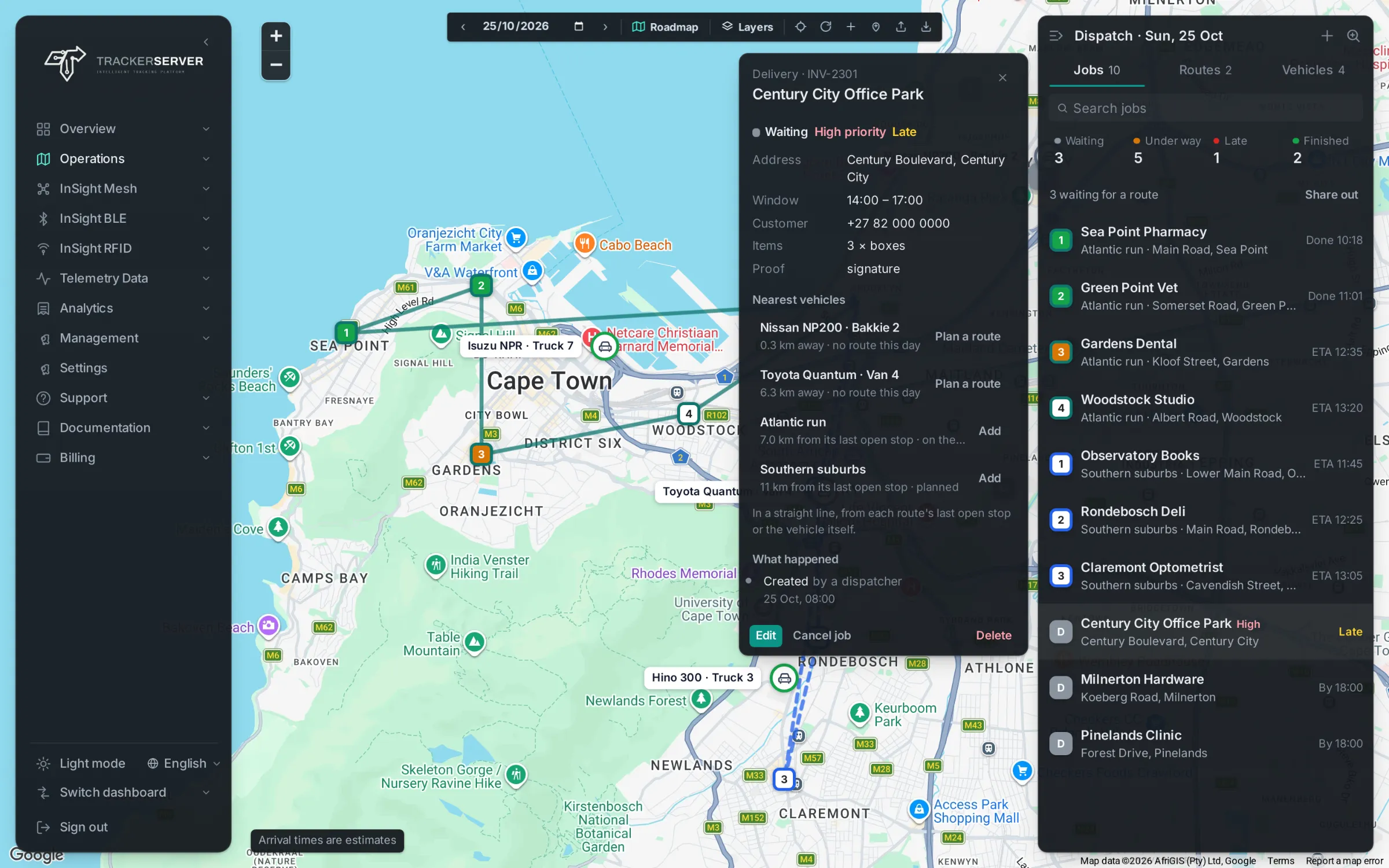
From the plan to the signature.
On the live map
Jobs, routes and the fleet on one map, with the day's jobs counted as waiting, under way, late and finished above the list.
The nearest vehicles
Open a job and the vehicles and routes closest to it are listed: plan a new route for a free vehicle, or add the job to a route already out.
Share out and best order
Share the waiting jobs out between the day's routes in one click, and put each route's stops in the best order.
A driver link for the day
Each driver gets one link with their stops in order. It opens on any phone, with no app to install and no password.
Arrival times and proof
Every job's estimated arrival, updated from the vehicle's position, and a signature or a photo as proof of delivery, kept with the job.
Import and export
Paste jobs from a spreadsheet or open a CSV file, and export the day's jobs with their arrival and completion times.
Customer tracking page
Customers follow their delivery on a tracking page of their own, under your brand: when it is expected, how many stops come before theirs, and the vehicle on the map once it is on its way to them.
Running late
A job that runs past its window is marked late on the list and on the map, so the dispatcher sees it before the customer calls.
Works with
Premium tracking software, under your own brand.
Offered by application: a dedicated server with every module, your logo, domain and emails.